Digital Asset Fund Withdrawal on Fystack: Secure, Controlled Withdrawal Workflows

Withdrawing funds is where custody risk becomes real.
For teams managing stablecoins and digital assets, a withdrawal workflow must do more than send funds. It must enforce approvals, verify recipient risk, preserve auditability, and maintain operational control across multiple signers and teams.
Fystack is designed around this reality. As an enterprise-grade digital asset custody platform, Fystack structures withdrawals around MPC security, configurable approval thresholds, and built-in risk verification, so teams can execute outbound transactions with confidence and accountability.
This guide walks through how secure fund withdrawals work on Fystack, step by step.
Every withdrawal on Fystack is policy-enforced before execution
On many custody platforms, withdrawals are treated as a simple signing action.
On Fystack, every withdrawal is part of a controlled operational workflow, defined by:
- Workspace-level boundaries
- MPC wallet security
- Multi-signer approval thresholds
- Address risk verification
- Full transaction audit trails
This ensures that funds never move based on a single decision or a single key.
1. Select the Wallet Within Your Workspace
All withdrawals on Fystack start inside a workspace.
From the workspace dashboard:
- Select the wallet you want to send funds from
- View the wallet’s current configuration, including signer threshold

At this stage, teams have full visibility into who controls the wallet and how many approvals are required before any transaction can be executed.
2. Configure Multi-Signer Approval Thresholds
Before initiating a withdrawal, teams can adjust the wallet’s security rules.
From the wallet Settings tab:
- Locate the multi-signature (approval threshold) configuration
- Define how many signers are required per transaction
- Confirm the new threshold

For example, moving from a 1-of-2 to a 2-of-2 approval model ensures that no single signer can unilaterally move funds.
This is a core advantage of Fystack’s MPC-based custody:
- No single private key exists
- Signing authority is distributed
- Operational control is enforced cryptographically
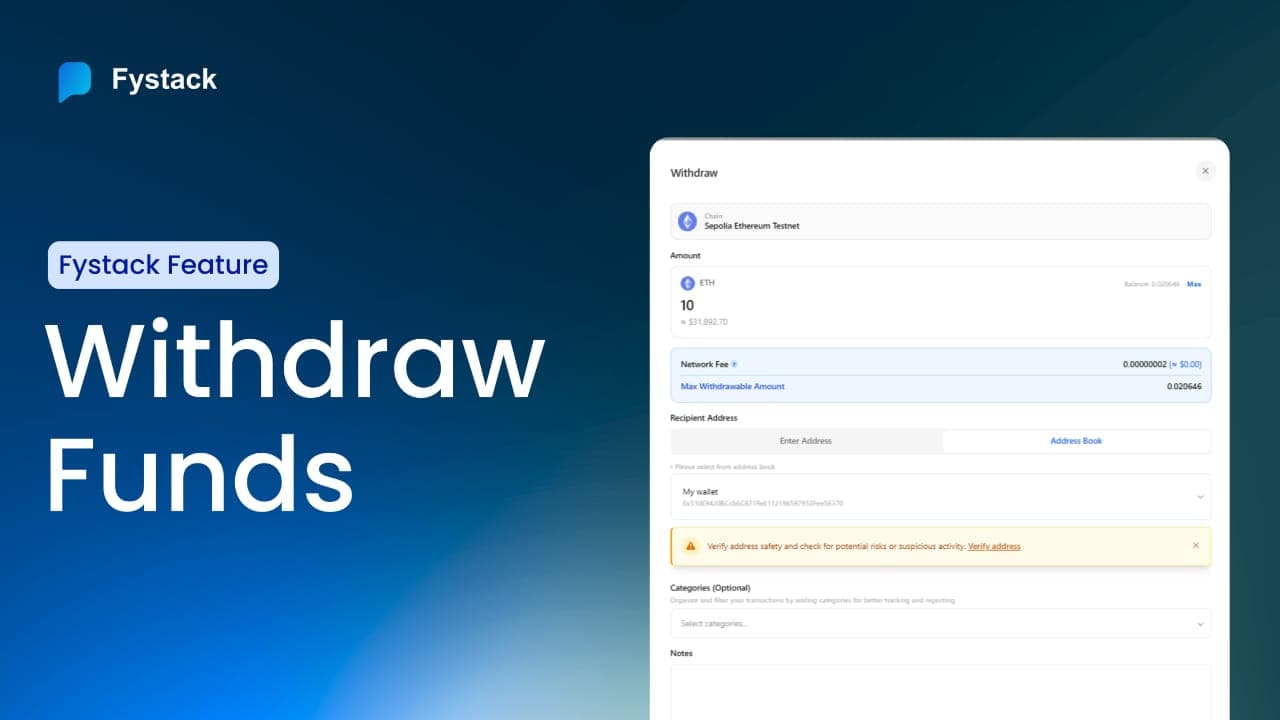
3. Initiate the Withdrawal Request
Once security rules are in place, initiate the transaction.
Click Send, then:
- Enter the withdrawal amount
- Select a recipient from your address book or add a new address
- Save the address for future use if needed

This structured approach reduces manual errors and supports repeatable operational workflows.
4. Verify Recipient Address Risk (Critical Step)
Before submitting the withdrawal, Fystack enforces a crucial control: address verification.
By clicking Verify Address:
- The system checks the recipient against integrated risk signals
- A safety score is generated
- Suspicious or high-risk addresses are flagged

This KYT-style verification helps prevent:
- Transfers to sanctioned or risky addresses
- Accidental exposure to compliance violations
- Operational mistakes during outbound transfers
Unlike external tools, this risk check is embedded directly inside the custody workflow.
5. Add Custom Tags for Auditability
Before submitting the withdrawal, teams can:
- Add custom tags to organize transactions
- Include a transaction note explaining the purpose of the transfer

These details become part of the permanent transaction record, making:
- Internal reviews easier
- Audits faster
- Cross-team collaboration clearer
For finance and compliance teams, this metadata is as important as the transaction itself.
6. Submit and Enter Approval Workflow
After clicking Withdraw, the transaction enters a pending state.

At this point:
- No funds have moved
- The transaction awaits the required number of approvals
Other authorized signers immediately see an approval notification in their wallet interface.
7. Review and Approve as a Signer
Each signer can:
- Open the pending transaction
- Review full details (amount, recipient, notes, tags)
- Confirm the approval

Fystack ensures that every signer explicitly reviews the transaction before approving it, reinforcing shared responsibility and preventing blind approvals.
Once the final required signer approves, the transaction is executed.
8. Full Transaction Visibility and History
After execution, the withdrawal is fully recorded inside the platform.
Teams can view:
- Sender and recipient addresses
- Transaction value
- Timestamp
- Approval history

This creates a complete, immutable audit trail directly within the custody layer without relying on external explorers for operational oversight.
Why Fystack Withdrawals Scale for Teams
Fystack’s withdrawal workflow is designed for teams operating at scale, not individual users.
By combining:
- MPC wallets with no single-key risk
- Configurable approval thresholds
- Built-in address risk verification
- Rich transaction metadata
- Workspace-based operational boundaries
Fystack enables secure, repeatable withdrawals across multiple chains and organizational roles.
Withdrawals become a governed process, not a point of failure.
Have questions about your custody setup?
Share what you are building via the form and explore how Fystack’s MPC wallets, KYT integrations, and consolidation engine fit your architecture.
Not ready yet?
Join our Telegram for product updates and architecture discussions:
https://t.me/+9AtC0z8sS79iZjFl
FAQ
How does Fystack secure digital asset withdrawals?
Fystack secures withdrawals through MPC wallets, configurable multi-signer approval thresholds, and workspace-based access control. No single private key is ever exposed, and every withdrawal requires explicit approvals before execution.
Can teams configure approval rules for withdrawals?
Yes. Teams can define and update multi-signature thresholds directly from the wallet settings. This allows organizations to align withdrawal approvals with internal financial controls and compliance requirements.
How does address risk verification work?
Before submitting a withdrawal, users can verify the destination address. Fystack provides a risk score to help identify suspicious or high-risk addresses, reducing the chance of accidental or unsafe transfers.
What happens after a withdrawal is submitted?
Once submitted, the transaction enters a pending state and waits for the required number of signer approvals. Each signer receives a notification and can review all transaction details before approving.
Is every withdrawal auditable?
Yes. Fystack records every withdrawal with full transaction history, including sender and recipient addresses, transaction value, timestamps, approval actions, and internal notes—making audits and reviews straightforward.
Is Fystack suitable for both startups and enterprise teams?
Fystack is designed to support both growing startups and compliance-heavy enterprises. The same withdrawal workflow scales from small teams to complex organizations without changing security assumptions.