Managing Digital Asset Audit Trails and Analytics with Fystack

For teams managing digital asset custody across multiple markets, maintaining clean audit trails manually quickly becomes unmanageable. Transaction data lives across wallets, chains, spreadsheets, and internal tools. Context is lost. Reconciliation takes time. And when audits happen, teams are forced into reactive data gathering.
Fystack is built as a digital asset custody layer designed for both enterprises and fast-growing startups. Instead of relying on manual processes, it provides immutable audit trails and real-time analytics so teams can meet compliance, reporting, and internal control requirements with confidence.
This walkthrough follows the exact flow teams use inside Fystack to review analytics, inspect audit logs, and export transaction data for reporting and internal controls.
1. Analytics Dashboard: A Real-Time Overview of Your Custody Operations
All wallet activity and transactions within a Fystack workspace are automatically recorded by the system. This ensures finance and operations teams always have a single, reliable source of truth.

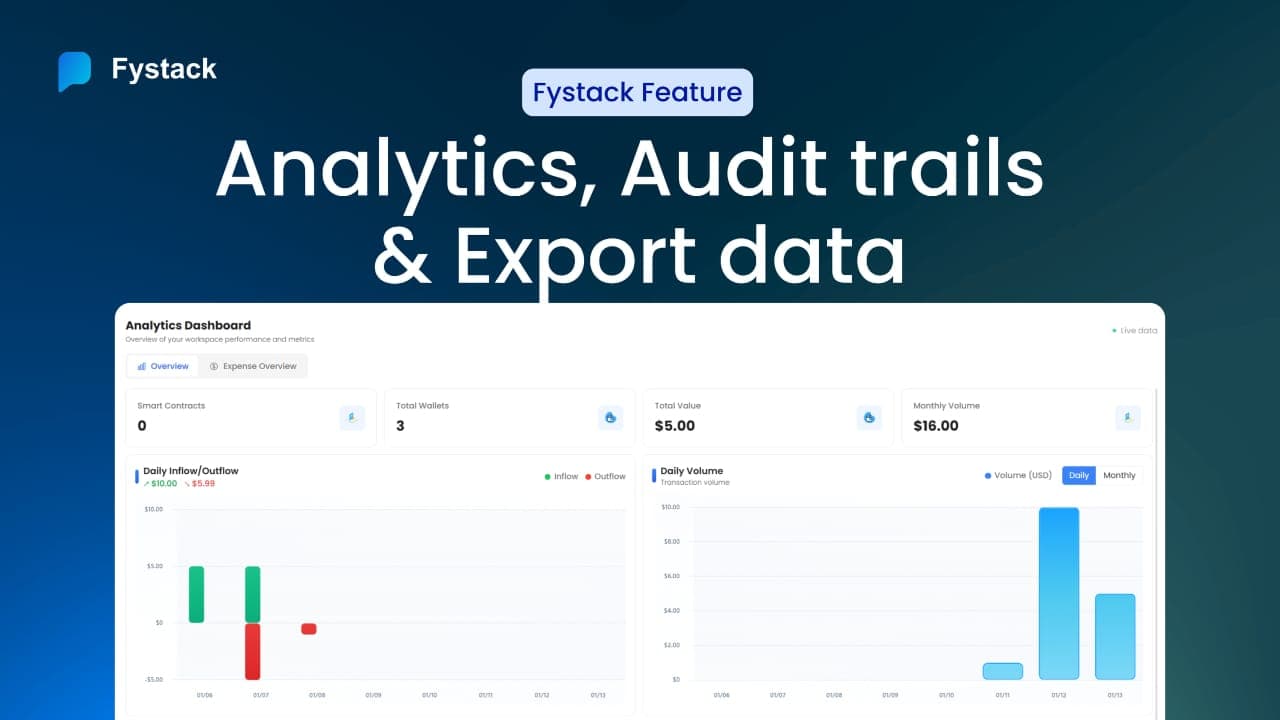
By navigating to the Analytics section, teams can immediately view a high-level overview of their digital asset activity, including:
- Total number of wallets in the workspace
- Total value secured across wallets
- Monthly transaction volume across all supported chains
- Smart contract interactions linked to the workspace
This consolidated view allows teams to assess operational health at a glance, without manual reconciliation or external dashboards.
2. Daily Inflow, Outflow, and Transaction Volume Tracking
For treasury and finance teams, understanding movement over time is critical.


Fystack’s analytics dashboard clearly records:
- Daily inflows and outflows with detailed breakdowns
- Daily and monthly transaction volumes
- Trends that help identify unusual spikes or drops in activity
Instead of discovering issues after a reporting cycle closes, teams can monitor liquidity and activity in real time, enabling faster decisions and proactive risk management.
3. Network Fees and Cost Visibility Across Chains
On-chain operations introduce variable network fees that are often difficult to track accurately.

Fystack automatically records monthly network fees, including:
- Fee amount
- Blockchain network
- Asset or currency used
Each transaction, such as a USDC transfer on a specific network, is logged with full fee details. This gives finance teams clear cost visibility for budgeting, reconciliation, and operational optimization.
4. Expense Analysis Using Transaction Tags
Operational clarity depends on context, not just raw transaction data.

With Fystack, teams can apply custom tags to transactions at the time of execution. These tags allow expenses and transfers to be analyzed by:
- Department or team
- Operational purpose
- Internal cost center or project
In the Expense Overview, transactions are automatically grouped based on these tags, making it significantly easier to review spending patterns and maintain internal controls.
This tagging discipline is especially valuable for startups preparing for audits and enterprises managing multiple teams and workflows.
5. Immutable Audit Logs for Full Accountability
To review all system activity, teams can access the Audit Log.

Fystack’s audit logs are immutable and record every action across the workspace, including:
- User logins
- Deposits and withdrawals
- Approval actions and signer participation
- Timestamps for every event
These logs create a complete, tamper-resistant history of custody operations, supporting both internal reviews and external compliance requirements.
6. Transaction History Filtering and Review
For deeper analysis, teams can navigate to the Transactions section.

Here, the full history of incoming and outgoing digital assets is stored and searchable. Transactions can be filtered by:
- Blockchain network
- Asset type
- Wallet
- Time range
This makes it easy to isolate specific activity, such as all USDC transactions on a particular network, without exporting or processing raw blockchain data manually.
7. Exporting Data for Reporting and Audits
When data needs to move outside the platform, Fystack makes exporting straightforward.

With a single action, teams can export detailed transaction and activity files for:
- Financial reporting
- Accounting reconciliation
- Internal audits
- Compliance reviews
The exported data retains full context, reducing the risk of misinterpretation and eliminating the need for post-processing.
Built for Enterprises and Startups Alike
Whether you are operating a crypto exchange, a stablecoin payment platform, or a Web3 fintech product, auditability is non-negotiable.
Fystack provides:
- Immutable audit trails for every custody action
- Real-time analytics for finance and operations teams
- Export-ready data for reporting and compliance
- Full visibility with data stored in your infrastructure, not a black-box SaaS
They are the foundation for secure, compliant, and scalable custody operations.
Have questions about your custody setup?
Share what you are building via the form and explore how Fystack’s MPC wallets, KYT integrations, and consolidation engine fit your architecture.
Not ready yet?
Join our Telegram for product updates and architecture discussions:
https://t.me/+9AtC0z8sS79iZjFl
FAQ
What assets can I deposit into a Fystack MPC wallet?
Fystack supports multiple digital assets across supported blockchain networks. Asset availability depends on the network selected when adding an asset to your MPC wallet. Commonly used assets include stablecoins such as USDC. Always ensure the asset and network match before depositing.
Can I deposit funds from any Web3 wallet or exchange?
Yes. You can deposit funds from any external Web3 wallet or supported exchange, as long as the asset type and blockchain network are compatible with the deposit address generated in your Fystack workspace.
What happens if I send the wrong asset or use the wrong network?
Deposits sent using an unsupported asset or incorrect network may not be recoverable. Fystack recommends verifying asset and network details carefully before initiating a transfer to reduce operational risk and avoid irreversible errors.
How long does it take for a deposit to appear on Fystack?
Deposit times depend on the blockchain network and required confirmation count. Once the transaction is confirmed on-chain, the balance is automatically reflected in your Fystack dashboard.
Is there a minimum deposit amount?
Minimum deposit requirements depend on the asset and network. Sending very small amounts may result in delayed confirmation or higher transaction costs.
Can teams generate multiple deposit addresses?
Yes. Fystack allows teams to generate multiple deposit addresses within a workspace, enabling better fund segregation by department, use case, or operational flow.
Why does Fystack use MPC wallets for deposits?
MPC wallets remove single private key risk and support role-based access control. This allows finance teams to manage incoming funds with clear ownership, internal controls, and audit-ready visibility from day one.
Where can I view deposit transaction details?
All deposit activity is visible within the Fystack dashboard. Transaction records include on-chain status, timestamps, and historical data, supporting reconciliation, reporting, and compliance reviews.