Digital Asset Custody Platform Onboarding on Fystack: Creating a Workspace & Role-Based Access

Fystack is an enterprise-grade crypto custody platform built for teams that require secure, compliant, and scalable MPC wallet infrastructure. Using Multi-Party Computation (MPC), Fystack enables organizations to manage digital assets without relying on single private keys.
Whether you are:
- Launching stablecoin payment rails
- Managing multi-chain treasury operations
- Building exchange-grade custody or OTC infrastructure
A correct onboarding process is critical. From account creation to workspace setup and role-based access, onboarding defines how securely your MPC wallets and custody workflows will operate.
This guide explains how to sign up on Fystack, create a workspace, and configure your team for secure crypto custody operations.
1. Sign Up for a Fystack Crypto Custody Account
The onboarding journey starts with creating a Fystack account. Fystack provides a hosted custody platform with multiple plans, supporting teams from early development to regulated production environments.

Steps to Register
- Visit the Fystack sign-up page
- Enter your professional email address and set a secure password
- Verify your email via the confirmation link
- Log in to the Fystack Console
Once completed, you gain access to the control layer where MPC wallets, workspaces, and team permissions are managed.
2. Create Your First Workspace on Fystack
After logging in, the next step is to create a workspace - the foundational unit of organization within the Fystack custody platform.
What Is a Workspace in a Crypto Custody Platform?
A workspace defines the operational boundary for your MPC wallet infrastructure. Each workspace groups:
- Team members and role-based access
- Wallets and assets under a single operational scope
- Workspace-level controls for managing access and activity
This structure enables separation of duties, governance enforcement, and scalable custody management across teams or products.
Step-by-Step Workspace Setup

- From the dashboard, click Create Workspace
- Enter a workspace name aligned with your use case (e.g., “Treasury MPC Wallets”)
- Optionally add a description for internal clarity
- Confirm creation
The workspace will appear in the sidebar and become the scope for all custody-related actions.
3. Invite Team Members & Configure Role-Based Access (RBAC)
Secure crypto custody requires strict access control. Fystack supports role-based access control (RBAC) to ensure that only authorized users can initiate or approve transactions.
How to Invite Team Members

- Open User Management within the workspace
- Click Invite Member
- Enter the user’s email address
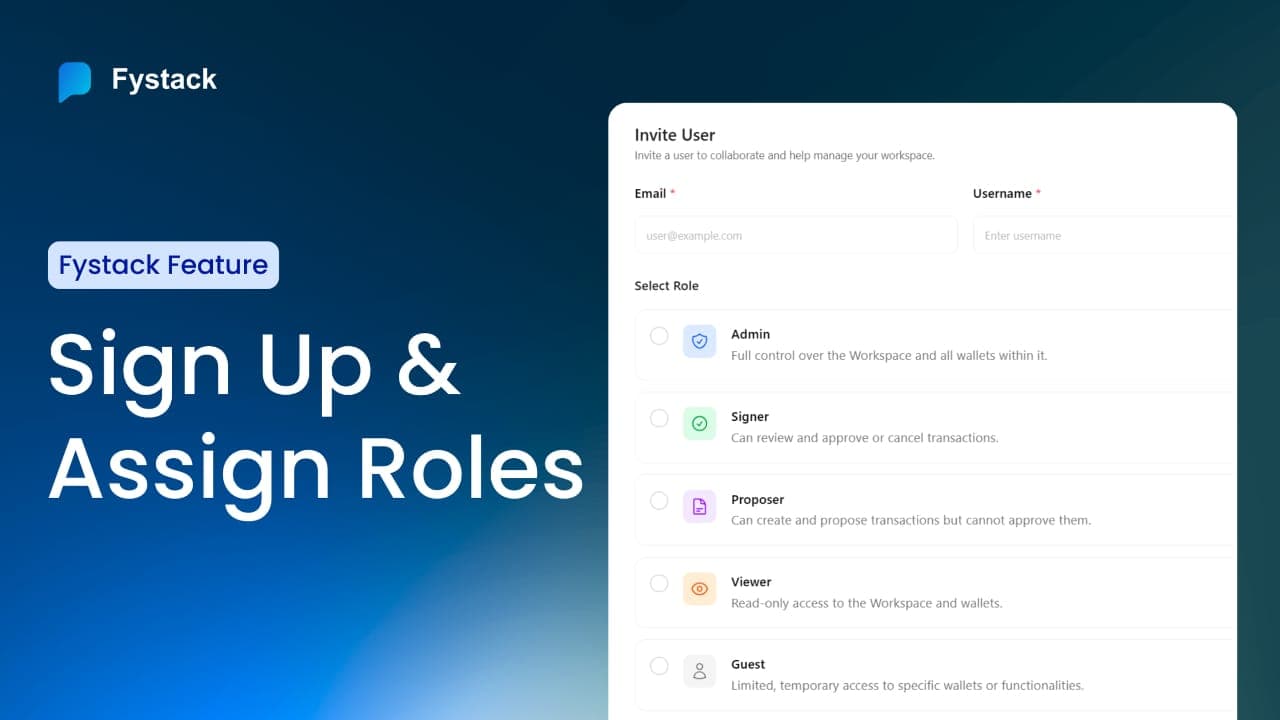
- Assign a role
- Send the invitation
Invited users will receive onboarding instructions via email. Invitations remain in “Pending” status until the recipient accepts.

Common Role Types
- Admin - Full control over workspace and MPC wallets
- Signer - Can review, approve, or cancel transactions
- Proposer - Can create transactions but cannot approve
- Viewer - Read-only access for monitoring
- Guest - Limited, temporary access
This role structure supports compliance requirements and internal controls for enterprise custody operations.
Summary: Crypto Custody Platform Onboarding on Fystack
To onboard successfully on Fystack:
- Register an account on the Fystack platform
- Create a workspace to scope MPC wallet operations
- Invite team members and assign roles
Once your workspace is created and team roles are assigned, you are ready to start managing fund security across multiple blockchains with Fystack.
From here, teams typically proceed to wallet setup and operational configuration based on their specific use case.
Have questions about your custody setup?
Share what you are building via the form and explore how Fystack’s MPC wallets, KYT integrations, and consolidation engine fit your architecture.
Not ready yet?
Join our Telegram for product updates and architecture discussions:
https://t.me/+9AtC0z8sS79iZjFl
FAQ
What is a workspace in Fystack?
A workspace is the core organizational unit in Fystack. It defines the operational boundary for team members, access permissions, and custody activities. All actions related to wallets and asset management are scoped within a workspace.
Why does Fystack require creating a workspace before managing assets?
Workspaces enforce separation of duties and access control from the start. This ensures that custody operations are organized, auditable, and aligned with enterprise governance requirements.
How does role-based access control (RBAC) improve custody security?
RBAC limits what each user can do within a workspace. By separating roles such as Admin, Signer, and Viewer, Fystack reduces operational risk and prevents unauthorized transactions or configuration changes.
Can I change user roles after inviting a team member?
Yes. Workspace administrators can update roles or revoke access at any time through the User Management section, allowing teams to adapt permissions as responsibilities change.
What happens if an invited user does not accept the invitation?
Invitations remain in a Pending state until accepted. Pending users do not have access to the workspace or any custody operations.
Is onboarding different for enterprise or regulated teams?
The onboarding flow is consistent, but enterprise teams typically configure stricter role assignments and operational boundaries during workspace setup to meet compliance and internal governance requirements.